Roborock Error 5 — Main brush jammed
DIRECT ANSWER
Brush still jammed after cleaning: what to check next
| What you see | What it points to | Next check | Source |
|---|---|---|---|
| Hair bands on the roller | The visible part of the jam | Remove them as your manual shows, then check both ends before refitting | Roborock Support: What should I do when error 5 occurs? |
| Roller looks clean, Error 5 returns soon after | The ends or a slot may still be holding the brush | Clean the ends the way your manual shows and look inside both slots | Roborock Support: What should I do when error 5 occurs? |
| Brush sits unevenly or the cover won't stay closed | Possibly a refit problem | Reseat both ends, lock the caps if your model has them, close the cover until it holds | Roborock S7 MaxV user manual (CE, English): main brush maintenance and error table |
| Cut bristles, a cracked end or a bent roller | Visible damage to the brush | Replace it with a brush for your exact model | Roborock S7 MaxV user manual (CE, English): main brush maintenance and error table |
| S8 Pro Ultra in Mop Only: brush raised and still, no error | Normal for that mode | Switch to a vacuum mode before judging the brush | Roborock S8 Pro Ultra user manual (FCC, English): main brushes and Mop Only mode |
| The alert names the maintenance brush | Error 42 on the dock of the named Ultra models | Follow the Error 42 checks, not the main brush steps | Roborock Support: Error 42, maintenance brush jammed (S7 MaxV Ultra, S7 Max Ultra, S8 Pro Ultra) |
| Ends and slots clear, parts seated, same Error 5 | A cause you can't identify at home | Note the model and alert, film a test run, contact Roborock support | Roborock Support: What should I do when error 5 occurs? |
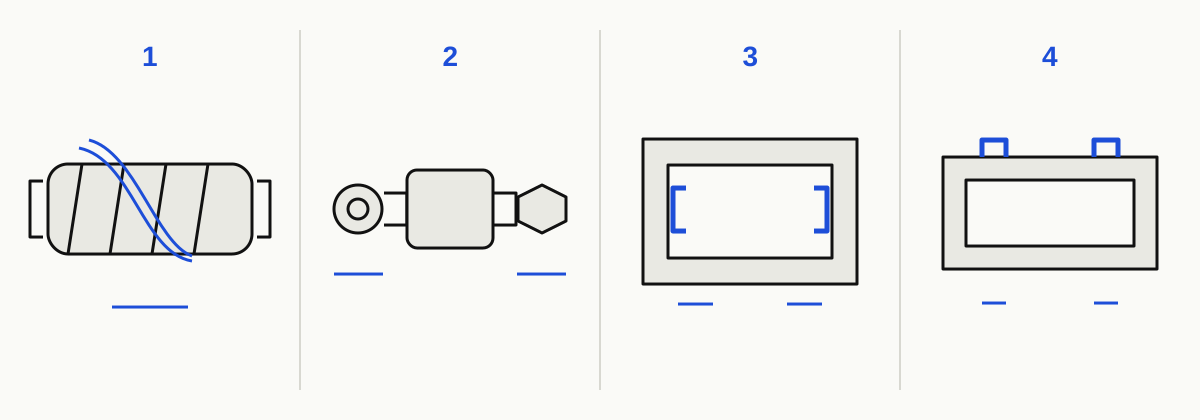
What to check, in order
Hair or thread wrapped around the roller
Long hair, pet fur and thread can wind into tight bands along the roller. Clear these first. A roller that looks clean afterwards can still be held at the points below.
Hair packed at the brush ends
Hair can work past the roller into the bearing area and hold the brush while the middle looks clean. How you reach the ends depends on the model, so use the model notes.
Debris in an installation slot
The brush ends sit in two slots inside the robot. A loose thread or small object there can stop a brush that is itself clean.
Brush or cover not refitted correctly
An end that isn't seated, a cap that isn't locked or cover clips that don't hold can keep the brush from turning properly. The manuals end brush maintenance by securing these parts, so check them before you look anywhere else.
Damaged brush or a fault you can't reach
Cut bristles, a cracked end or a bent roller may mean the brush needs replacing. If everything is clean, seated and undamaged and Error 5 still comes back, you can't pin down the cause at home. Roborock directs that case to support.
HOW TO FIX IT
Switch the robot off before you handle the brush. If your manual shows a cleaning tool for cutting hair, keep your fingers clear of its edge. Don't force a roller that won't turn by hand.
Switch off and confirm the alert
Power the robot off before handling it. Check that the App or voice prompt says Error 5 or main brush. If the alert names a maintenance brush, that is a different code with its own checks, covered in the branches below.
Remove the brush and clear the roller
Turn the robot over, release the cover clips and lift the brush out. Pull off wrapped hair and thread. Only use a cutting tool if your model's manual shows one for this job. On models with two brushes, clean both.
Clean both ends the way your manual shows
Roborock asks you to check both ends of the brush as well as the roller. Depending on the model, you twist the end cap to unlock it, pull it out, or only clean the bearing area. Don't force off a part that your manual doesn't show as removable.
Look inside both installation slots
With the brush out, shine a torch into the two slots where the brush ends sit. Remove any hair, thread or debris you can reach without pushing tools deeper into the robot.
Refit and inspect before testing
Lock the end caps if your model has them, set both ends into their slots and close the cover until the clips hold. Look for cut bristles, a cracked end or a bent roller. Cleaning won't fix that kind of damage, so plan on a replacement brush for your exact model.
Run a short test, then decide
Start a short clean. Roborock's Error 5 article suggests testing with Carpet mode on. Only do this if your App has an option with that exact name. If the same error comes back after you've cleaned the ends and slots and refitted the brush, contact Roborock support.
IF IT STILL FAILS
WHEN TO STOP
Stop and contact Roborock support in two cases: the brush still won't turn by hand after you've cleaned the roller, ends and slots, or Error 5 keeps coming back after a correct refit. Don't pry the brush out, push tools into the brush housing or open the robot to reach the drive. Have the exact model, the alert text and a short video ready.
COMPATIBLE PARTS
As an Amazon Associate, RoboFaults earns from qualifying purchases. Prices are shown on the retailer's site.
Roborock S7 Main Brush (fits S7 MaxV)
Only for an S7 MaxV whose main brush is visibly worn or damaged after you have cleaned the roller, ends and slots and refitted it correctly. A single Error 5 is not a reason to replace the brush. Roborock's US store lists this brush for the S7 MaxV. The listing doesn't name the base S7 and doesn't confirm stock or delivery outside the US. Source
Compatibility and replacement details → Official Roborock US store listingMODELS AFFECTED
| Model | Status | Firmware | Parts | Verified |
|---|---|---|---|---|
| Roborock S5 The S5 manual has you take off the brush cover, lift out the brush, clean the bearings and fit everything back securely. Separately, it shows the matching cleaning tool used to cut hair off the brush. It doesn't show end caps that twist or pull off, so don't borrow another model's method. · Source | limited | s5 | Parts → | 2026-07-05 · Source |
| Roborock S5 Max Single main brush. The manual has you rotate the end cap to unlock it, clean the bearing and cap, then turn it back until it locks. · Source | limited | s5 | Parts → | 2026-07-05 · Source |
| Roborock S6 MaxV Single main brush with removable bearings and rotating end caps. The error table lists Error 5 and points to cleaning the brush and bearings. · Source | limited | s6 | Parts → | 2026-07-05 · Source |
| Roborock S7 Single brush with end caps that rotate to unlock. The manual describes Error 5 as a stuck main brush and sends you to the brush and bearings. Check with Roborock before buying a replacement brush for the base S7. · Source | active | s7 | Parts → | 2026-07-05 · Source |
| Roborock S7 MaxV Single brush. Remove the bearings, rotate the end caps to unlock them, clean both ends, then lock the caps and close the cover until it clicks. The numbered illustration on this page is based on this model. · Source | active | s7 | Parts → | 2026-07-05 · Source |
| Roborock S8 Two main brushes. The manual has you remove the bearings, pull out the brush caps, clean the ends and refit. The cited manual has no numbered error table, so check the alert wording in the App. · Source | active | s8 | Parts → | 2026-07-05 · Source |
| Roborock S8 Pro Ultra Two brushes with pull-out caps. In Mop Only mode the main brush lifts and stops, which is normal. Check the mode before treating a still brush as a jam. · Source | active | s8 | Parts → | 2026-07-05 · Source |
Models resolved from the series chips above. Support status comes from our EOL library; rows link to the matching parts and firmware pages.
FIELD NOTES
Roborock's Error 5 article is short. Its most useful part is the list of places to check: the brush, the two installation slots and both ends of the brush. If you only clean the roller, the ends and slots go unchecked, and they are the next things to look at when the alert comes back. A result after one clean and refit tells you where to look next, but it can't prove where the jam was. If the error stops after you work on the ends, keep the ends in your routine. If it stops only after you refit the cover properly, pay attention to seating next time.
The ends are where models differ. The original S5 manual describes cleaning the bearings and doesn't show removable caps. The S5 Max, S6 MaxV, S7 and S7 MaxV manuals use end caps that rotate to unlock. The S8 and S8 Pro Ultra have two brushes with caps that pull out. Use your own model's method rather than forcing a part that won't move.
A brush that isn't turning isn't always faulty. On the S8 Pro Ultra, Mop Only mode lifts the brush and stops it. A maintenance brush alert on the S7 MaxV Ultra, S7 Max Ultra or S8 Pro Ultra comes from the dock. It is Error 42 and has its own checks.
Error 5 appears in the error tables of the S6 MaxV, S7 and S7 MaxV manuals. For the S5, S5 Max, S8 and S8 Pro Ultra, this page relies on their brush maintenance sections. It has no model-specific steps for the base S6, Q5 or Q7, so on those robots follow the alert wording and your own manual. The Carpet mode retest only applies if your App has that option; other carpet settings may behave differently.
A clean brush that still triggers the error doesn't prove the motor has failed, and a factory reset isn't part of Roborock's Error 5 steps. If the error persists after a careful clean and refit, contact support.
FAQ · REAL QUESTIONS
What does Roborock error 5 mean?
The main brush under the robot can't turn. Roborock asks you to check for hair or thread on the roller, both ends of the brush and the two slots it sits in. Clean them, refit the brush and cover, then run a short test.
Why does my Roborock keep saying main brush jammed when the brush is clean?
A roller can look clean and still be held by hair at the ends, debris in an installation slot, or a brush or cover that didn't seat on refit. Check each with your model's manual. If all are clear and Error 5 persists, contact Roborock support.
How do I reset a Roborock after error 5?
Roborock's Error 5 guidance doesn't call for a factory reset. Clear the brush, ends and slots, refit everything and retest. If the same error returns, contact Roborock support rather than restoring factory settings.
Is error 42 the same as error 5 on a Roborock?
No. Error 5 refers to the main brush under the robot. Error 42 refers to the maintenance brush in the dock on the S7 MaxV Ultra, S7 Max Ultra and S8 Pro Ultra. If it stopped on the left, check for a jam; if it stopped on the right, check the dock filter.
How do I clear a jammed main brush on a Roborock S8?
Check the alert wording in the App first. The S8 has two main brushes. Its manual has you remove the bearings, pull out the brush caps, clean the ends and refit. Clean both brushes, then retest.
Sources
- Roborock Support: What should I do when error 5 occurs?
- Roborock Support: Error 42, maintenance brush jammed (S7 MaxV Ultra, S7 Max Ultra, S8 Pro Ultra)
- Roborock Support: Carpet Boost activated on hard floors
- Roborock S5 user manual (CE, English): main brush maintenance
- Roborock S5 Max user manual (English): routine maintenance
- Roborock S6 MaxV user manual (FCC, English): maintenance and error table
- Roborock S7 user manual (English): main brush and error table
- Roborock S7 MaxV user manual (CE, English): main brush maintenance and error table
- Roborock S8 user manual (FCC, English): main brush maintenance
- Roborock S8 Pro Ultra user manual (FCC, English): main brushes and Mop Only mode
- Roborock US store: S7 Main Brush listing (lists S7 MaxV)
Corrections
Spotted an error? Report a correction — fixes ship within 48h and are logged on this page.